
Quality Management System Software
Quality Made Simple. Powered by SharePoint.
QMS|share is built natively on Microsoft 365 — document control, audits, nonconformance and corrective action, and change management all run inside SharePoint, without a new platform, new logins, or new vendor contracts.
M365
Native — No New Platform
ISO
9001 Validated
30
Days Post-Launch Support
30+
Years of Microsoft Expertise
A Complete Quality Management System That Lives Where Your Team Works
QMS|share delivers a fully configured quality management system built on Microsoft SharePoint — eliminating the need for a standalone QMS platform while supporting ISO 9001 alignment.
- Document control with version history and approval workflows
- Audit scheduling, checklists, and finding management
- Corrective action tracking from root cause through verification
- Management of change with impact assessment and approvals
- Works inside your existing Microsoft 365 tenant — no new platform

The Captain's Seat for Your Quality Team
Quality Hub is the command center for quality managers and team leads inside QMS|share. Every open nonconformance, pending corrective action, upcoming audit, and unresolved change request surfaces in a single real-time dashboard.
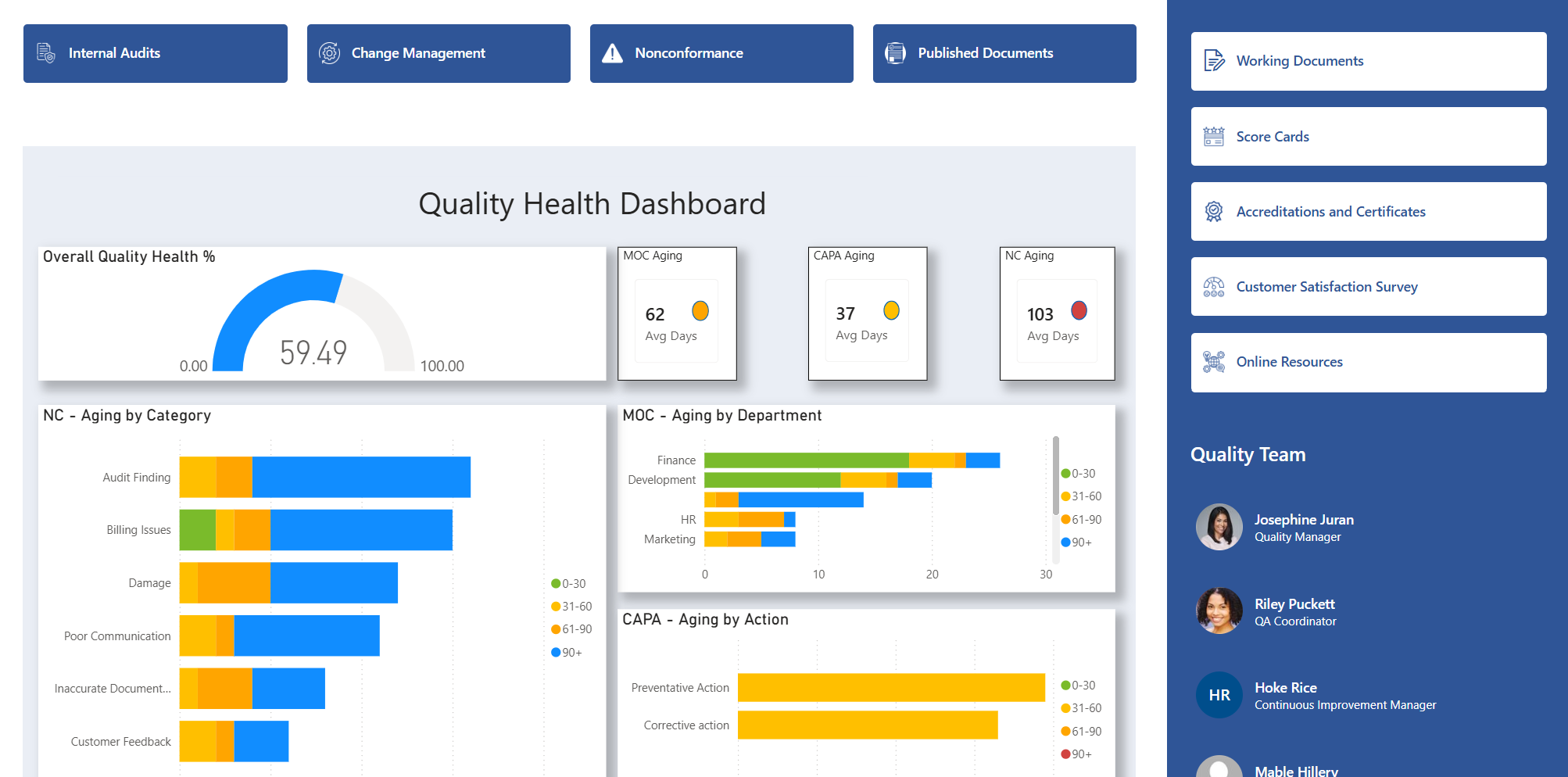
MYQueue brings this same visibility to every employee who participates in the quality system. Each person gets a personalized task queue filtered to their role — pending approvals, in-progress corrective actions, upcoming audits, and change requests all in one prioritized view.
- Real-time overview of all open quality records across every module
- Personalized MYQueue filtered to each employee's role and assignments
- Overdue item flagging with owner and due-date visibility
- Cross-module visibility — documents, audits, corrective actions, and MOC in one place
- Trend analysis for recurring nonconformances and corrective action effectiveness
- Configurable views by department, product line, or compliance area
One Unified Quality System. Multiple Modules.
Each QMS|share module is purpose-built for a core quality function — and all of them run natively inside your Microsoft 365 environment.

Document Control
Centralize all quality documents in SharePoint with automated version control, review cycles, and approval workflows.
- Controlled document library with auto-versioning
- Configurable review and approval workflows
- Document acknowledgment tracking
- Expiry alerts and periodic review scheduling

Management of Change
Manage every change request from submission through impact assessment, approval, and implementation tracking.
- Structured change request submission form
- Multi-stage review and approval routing
- Impact assessment documentation
- Implementation verification and closure
Audits
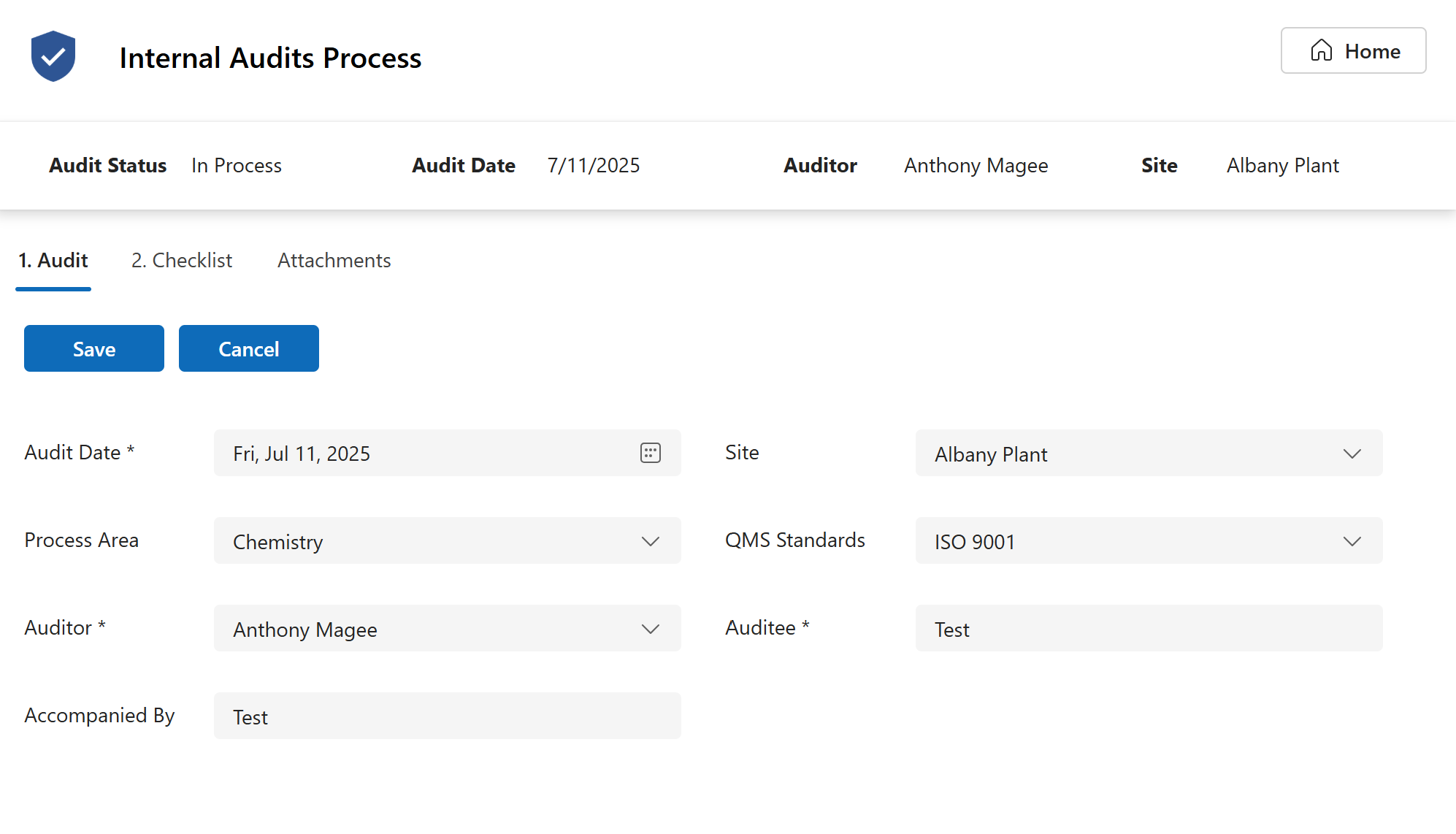
Plan, execute, and close audits with structured checklists, finding logs, and corrective action tracking.
- Audit schedule and program management
- Configurable audit checklists by ISO clause
- Finding and observation logging
- Findings link directly to the Nonconformance & Corrective Action module

Nonconformance & Corrective Action
Capture nonconformances, perform root cause analysis, and track corrective actions through to verified closure.
- NC intake with immediate containment tracking
- Root cause upload section and notes field
- Corrective action assignment and due-date tracking
- Effectiveness verification and closure workflow
Your QMS Already Lives Inside Your Microsoft Tenant
QMS|share doesn’t run alongside Microsoft 365 — it runs inside it. Documents, workflows, approvals, and records are stored in your SharePoint environment, governed by your existing Azure AD policies, and surfaced in Teams without any external API connections or data replication.
This means your IT team doesn’t need to manage another vendor, your security posture stays intact, and your employees never leave the Microsoft ecosystem to do quality work.
SharePoint
Microsoft Teams
Azure AD
Power BI
Enterprise-Grade Security
All data stays inside your Azure tenant. Role-based permissions enforced by Azure Active Directory.
Familiar User Experience
Your team works in SharePoint and Teams today. QMS|share requires zero retraining.
ISO 9001 Pre-Configured
Every module maps directly to ISO 9001 clause requirements. Audit-ready from day one.
No Additional Licensing
Runs on the Microsoft 365 licenses you already pay for. No QMS vendor subscription required.
How We Deploy QMS|share in Your Environment
Every QMS|share implementation follows a structured five-phase process designed to get your team into a production quality system, with a fast time to launch.
01
Enterprise-Grade Security
All data stays inside your Azure tenant. Role-based permissions enforced by Azure Active Directory.
02
Environment Configuration
Our team provisions the QMS|share site collection in your SharePoint tenant, configures permissions via Azure AD groups, and sets up all module frameworks.
03
Content Migration & Setup
Existing documents, procedures, and records are migrated into the controlled document library with version history intact and metadata configured.
04
Training & Validation
We train your quality team and system administrators, then run a validation pass across all deployed modules to confirm ISO 9001 compliance alignment.
05
Go-Live & Hypercare
System goes live with a defined hypercare period. Abel Solutions provides direct support for the first 30 days to resolve any configuration or adoption issues.
Quality Systems for Regulated & Complex Industries
Manufacturing
Quality process management and audit-ready records for discrete and process manufacturing.
Pharmaceutical & Life Sciences
Quality infrastructure and ISO 9001-aligned workflows inside your existing M365 environment.
Defense & Aerospace
Structured audit readiness and quality oversight for complex, high-stakes supply chains.
Medical Devices
Design history files, device master records, and corrective action workflows in one place.
Automotive
Process documentation and supplier quality management across your production ecosystem.
Food & Beverage
Quality record management and traceability for food safety and operational compliance.
Energy & Utilities
Operational quality systems and structured record-keeping for energy management and infrastructure teams.
Healthcare
Quality operations and record-keeping for clinics, hospitals, and healthcare organizations.
Frequently Asked Questions About QMS|share
What is QMS|share?
QMS|share is quality management system software built natively on Microsoft SharePoint and Microsoft 365. Unlike standalone QMS platforms, QMS|share runs entirely inside your existing Microsoft 365 tenant — giving your team document control, audits, nonconformance and corrective action, and change management without a new platform, new logins, or additional vendor contracts.
Does QMS|share require a separate Microsoft 365 license?
No. QMS|share runs on the Microsoft 365 licenses your organization already has. Standard Business or Enterprise M365 plans that include SharePoint are sufficient. There is no additional Microsoft licensing requirement beyond what you currently pay.
How long does implementation take?
QMS|share is built for a fast time to launch. The exact timeline depends on the number of modules deployed, the volume of existing documentation to migrate, and the complexity of your approval workflows. Abel Solutions provides a scoped implementation plan during the discovery phase.
Can we deploy individual modules or do we need the full suite?
QMS|share is modular by design. You can start with one module — such as Document Control — and add Audits, Nonconformance & Corrective Action, or Management of Change as your quality program matures. All modules integrate with the shared Quality Hub and MYQueue dashboard regardless of which combination you deploy.
What support is included after go-live?
Every QMS|share implementation includes a 30-day hypercare period with direct support from the Abel Solutions team. Ongoing support, training, and system enhancements are available through Abel Solutions’ managed services offerings. Contact the team to discuss your post-launch support needs.
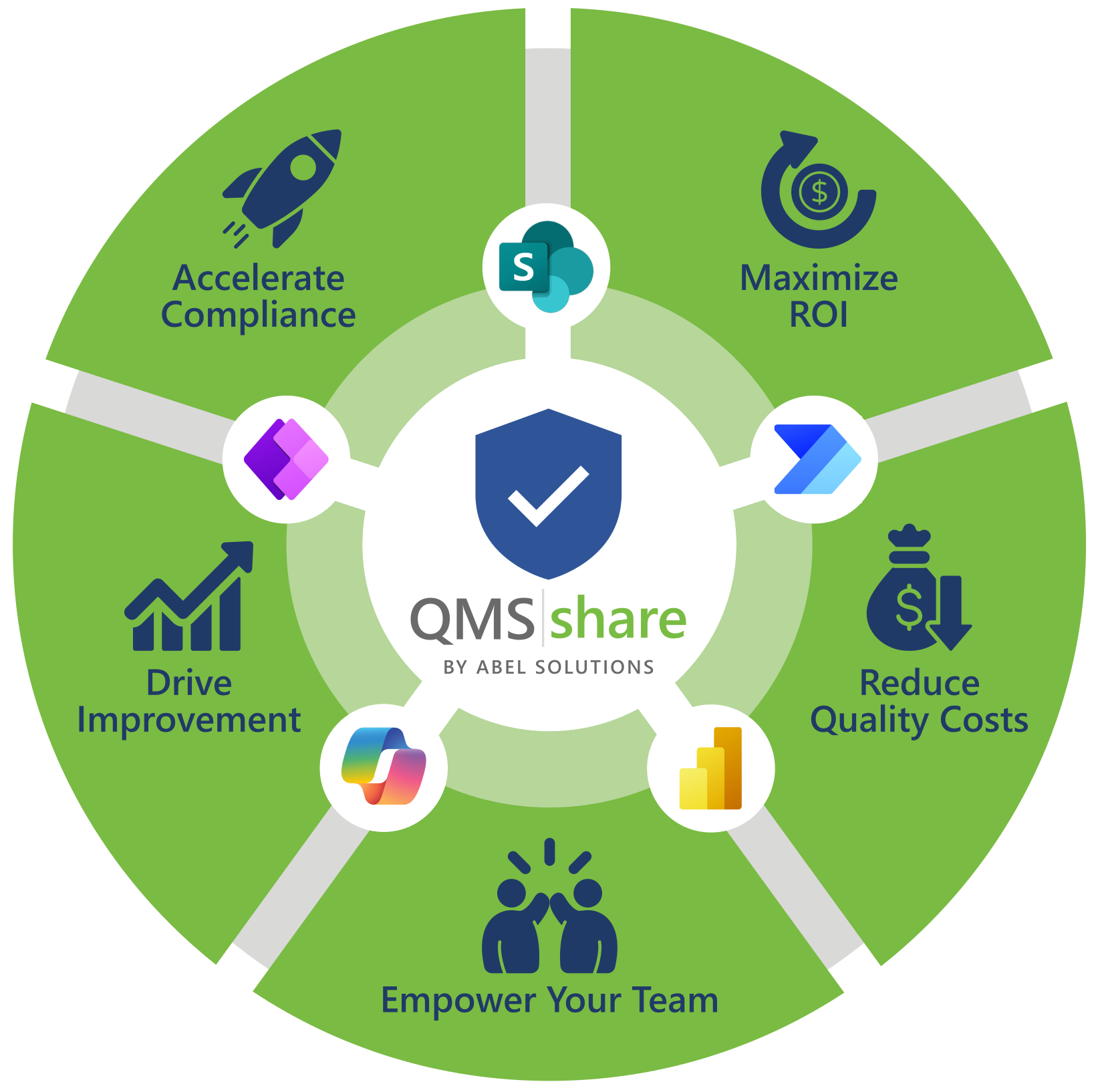
Five Reasons Quality Teams Choose QMS|share
QMS|share isn’t just another quality platform — it’s the quality system that already lives inside the tools your team uses every day.
Accelerate Compliance
QMS|share modules align directly to ISO 9001 clause requirements. Document control, audit management, corrective action workflows, and change records are pre-configured so your quality system is audit-ready from day one — not months of customization later.
Reduce Quality Costs
No separate QMS vendor license. No third-party hosting fees. QMS|share runs on your existing Microsoft 365 subscription — so the platform cost you're already paying becomes your quality management platform.
Drive Continuous Improvement
Integrated Power BI dashboards surface trends across nonconformances, corrective action effectiveness, and audit findings — turning reactive firefighting into proactive, data-driven improvement.
Maximize ROI
Fast time to launch. No infrastructure buildout, no extended vendor onboarding — your team is in a production quality system faster, which means faster time to compliance and faster return on your investment.
Empower Your Team
Your team already knows SharePoint. QMS|share builds on that familiarity — so adoption is faster, training is lighter, and resistance to change drops dramatically compared to introducing a completely new platform.
Ready to See QMS|share in Your Environment?
Schedule a live demo and see how QMS|share runs inside your existing Microsoft 365 tenant — no separate platform, no new logins, no disruption to your team.